Ink.
Template once. Sign anything.
Ink turns Word documents into reusable templates. Fill them in seconds, route them out for signature — or skip signing entirely and ship finished PDFs straight from your desktop.
No subscriptions No tracking Files live on your computer
Wrong build? Apple Silicon · Intel
Windows — coming soon

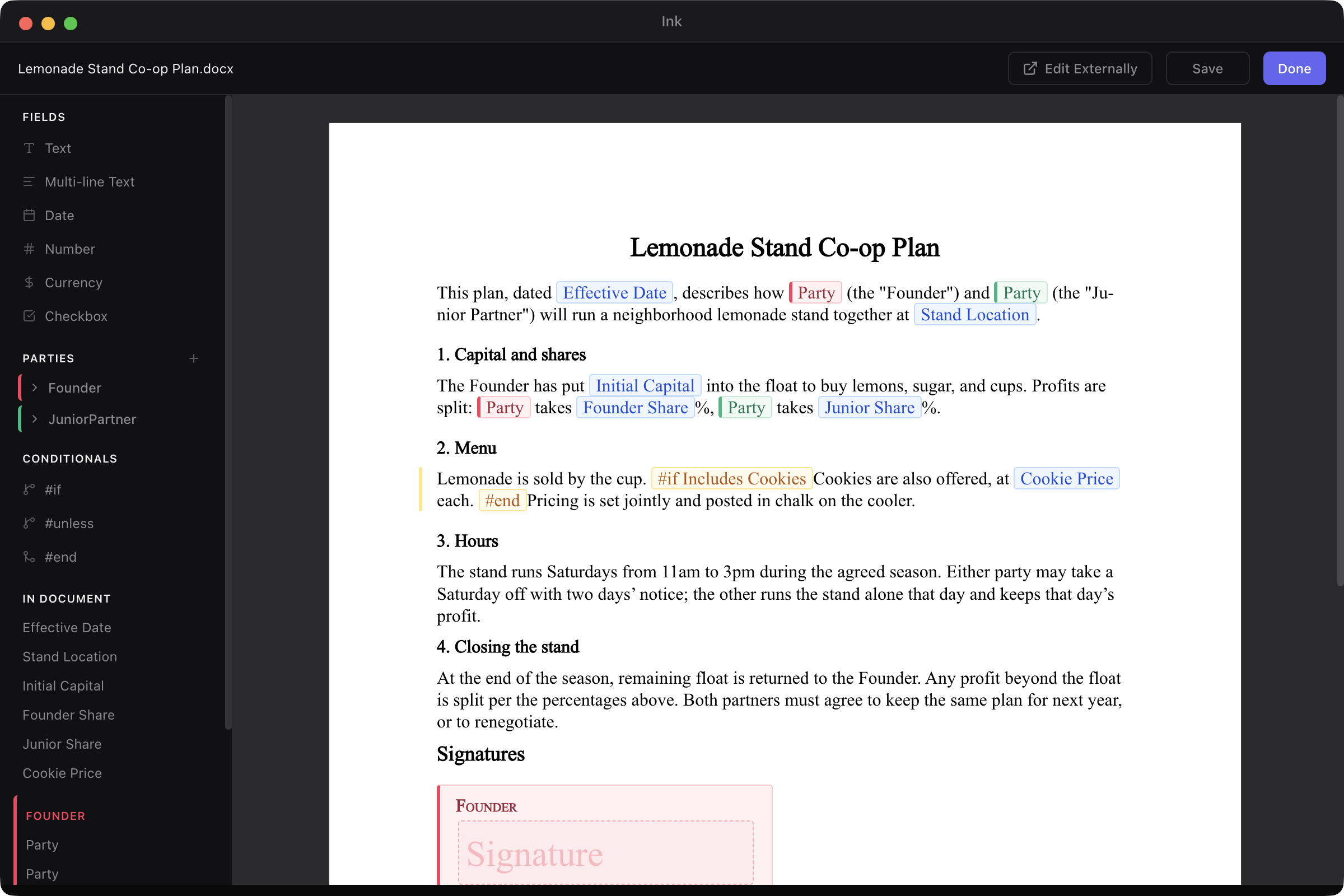
Fig. 01 — a co-op agreement template, open in the editor — fields and parties marked up, conditionals in place, ready to fill and sign.
Three rules.
No more.
-
i.
Your files, on your drive.
Templates and generated documents live in a folder you choose. Drop it in Dropbox or iCloud if you want sync. We never see them — Ink has zero document storage, and zero plans to add it.
-
ii.
Word in. PDF out.
Open your Word docs in Ink's built-in editor and place fields with a point-and-click. Ink merges your data in and renders to PDF locally, using your own installed fonts — with a one-click swap when the original isn't on your computer. No formatting drift. No mystery whitespace. No round-trip through someone else's server.
-
iii.
Sign anywhere — or don't.
Connect an e-signature platform — Adobe Sign or SignWell — with your own credentials, and route documents out for signature. Or skip signing entirely and use Ink as a generator: finished PDFs, fillable PDF forms, and filled Word documents. Either path is first-class. We don't take a cut of your envelopes; you don't pay us per signature.


From Word doc
to signed PDF
in three moves.

-
01
Build the template.
Open your Word doc in Ink and place fields with a point-and-click. Conditionals, nested data, full templating power — without ever leaving the editor.
-
02
Fill the fields.
Ink reads the fields out of your template and builds you a form. Type once, generate one or many. Save the values as a set to reuse later.
-
03
Render or send.
Hit Regenerate outputs for a clean PDF on your desktop — or a fillable PDF form ready to email. Connect an e-signature platform and push it out for signature instead, with signers, fields, and routing order pre-wired from the template.
One price.
One license.
Pay once.

Launch promo · ends August 2026
$99 $79 USD
One-time. No subscription. No recurring fees.
- Pay once — your license, no recurring fees
- 3 computers per key (deactivate any time to swap)
- 14-day free trial, fully unlimited
- macOS 12 Monterey or later · Windows soon
By purchasing, you agree to the EULA and waive your 14-day right of withdrawal (EU/UK). All sales are final.
Frequently
asked.
- License activation — once per computer, when you paste your key.
- Signing platform — only when you click Send for signature, and only to the platform you configured.
- Update check — periodic, against our release feed at
get-ink.app. Disable in Settings if you'd rather check manually.
Why a one-time fee instead of a subscription?
Ink runs entirely on your computer — there's no server in the loop to charge you for. You pay once for a license to use it, and that's it. No recurring fees, no metered envelopes.
What happens after the 14-day trial?
The app stays installed. You can still open existing documents in read-only mode — nothing is deleted, nothing is held against you. Buy a license and the full editor unlocks again, with all your work intact.
Where do my files actually live?
In a folder on your computer, picked during first-run setup. The default
is an Ink folder inside your Documents, but you can put it
anywhere — a Dropbox folder, an iCloud Drive folder, a OneDrive folder,
a NAS mount, whatever fits how you already work. Ink doesn't sync,
watch, or read it any more than your text editor would.
Does Ink need internet?
Three outbound connections, all explicit:
Templating, filling, and PDF generation are fully offline. No analytics. No tracking. Nothing else.
How many computers per license?
Three. Deactivate any computer from Settings to free up a slot.
Is my data sent anywhere?
No. Templates and generated documents never leave your computer except when you send them — by email, by signing platform, or by dragging the PDF somewhere. Ink ships with zero analytics, zero session recording, and zero crash reporting.
When is the Windows version coming?
macOS support is available today; Windows follows shortly after. The same one-time license unlocks the Windows build when it lands.
I'm an EU/UK customer — what about the 14-day right of withdrawal?
By purchasing, you agree to the EULA, which addresses the 14-day right of withdrawal (EU/UK) given that your license key is delivered immediately. All sales are final.
How do I get help?
Email support@springcraft.ai. We're a small team — replies usually land within one business day.